
Instructions
1. Navigate to the MyFSU portal and login with your FSU credentials.
- If prompted, verify your identity using the DUO process.
- If your telephone number has changed, please contact the ITS Service Desk at 850.644.4357 (Select Option 6 and have your User ID ready) or visit https://its.fsu.edu/help. You will need to set up the DUO security process if you have not already done so. For more information about setting up DUO, visit the 2FA website.
2. On the MyFSU home page, select QUICKLINKS from the top menu bar.

3. Under Category, select one of the following:
- If you are a current FSU employee, select Human Resources.
- If you a former FSU employee, select Former Employees.

4. Select the W2/W2-C Forms tile.

5. Select 2025 from the Tax Year dropdown menu.

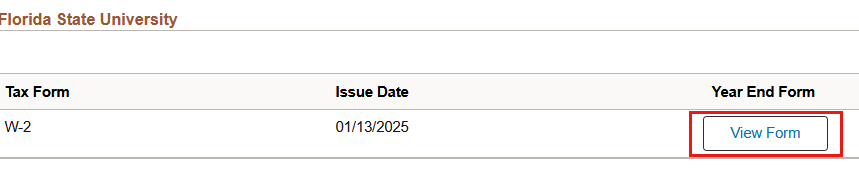
6. Select View Form.
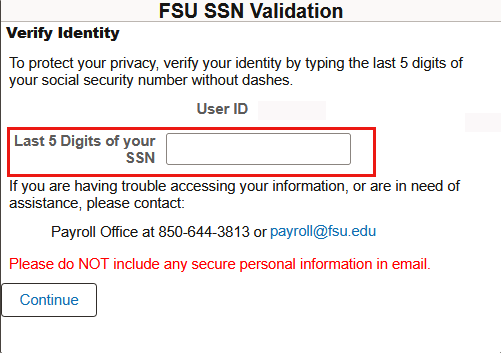
7. When prompted, please validate ID by entering the last five digits of your Social Security Number and clicking Continue. Once verified, the form will open in your browser as a PDF and can be downloaded or saved.
Troubleshooting Tips
- When validating ID, please make sure to enter the last five digits of your Social Security Number.
- If the W-2 form does not open on your browser screen, ensure that your pop-up blocker has been disabled.
- If you terminated your employment with FSU during 2025, you still have access to OMNI to retrieve your W-2 until October 15, 2026.
- From the portal, select the magnifying glass in the top banner and search W-2 to navigate to the page.
- If you experience any issues accessing MyFSU Portal, contact the ITS Service Desk at 850.644.HELP (4357) (Select Option 6 and have your User ID ready).
For any questions regarding W-2 or assistance with payroll questions, please contact payroll@fsu.edu